Find the output of the MySQL query based on the given Table-STUDENT (ignore…
2023
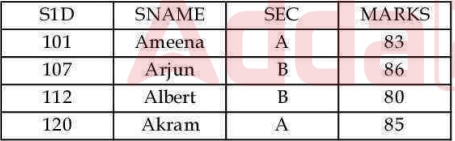
Find the output of the MySQL query based on the given Table-STUDENT (ignore the output header) Table: STUDENT Query: SELECT SEC, AVG (MARKS) FROM STUDENT GROUP BY SEC HAVING MIN (MARKS) > 80;
Answer: B. A 84 — GROUP BY splits rows into buckets by the grouping column and computes each aggregate (MIN, AVG, ...) separately per bucket. HAVING then filters OUT whole…
- A.
B 83
- B.
A 84
- C.
A 84
B 83 - D.
A 83
B 80
Attempted by 1468 students.
Show answer & explanation
Correct answer: B
GROUP BY splits rows into buckets by the grouping column and computes each aggregate (MIN, AVG, ...) separately per bucket. HAVING then filters OUT whole buckets after aggregation — a bucket is kept only if it satisfies the HAVING condition; once a bucket fails HAVING, none of its rows can appear in the output, regardless of what other aggregates on that bucket would show.
Group the STUDENT rows by SEC: SEC = A holds Ameena (83) and Akram (85); SEC = B holds Arjun (86) and Albert (80).
For SEC = A: MIN(MARKS) = MIN(83, 85) = 83, and AVG(MARKS) = (83 + 85) / 2 = 84.
For SEC = B: MIN(MARKS) = MIN(86, 80) = 80.
Apply HAVING MIN(MARKS) > 80: SEC = A has MIN = 83, which is greater than 80, so its bucket passes and its row (A, 84) is kept. SEC = B has MIN = 80, which is NOT strictly greater than 80, so its entire bucket is dropped — B's row can never reach the output, no matter what its average is.
Independent check: only one section (A) has both students scoring above 80, so only one bucket can ever pass a strict MIN(MARKS) > 80 filter here — confirming a single-row result before even computing any average.
Final output: exactly one row — SEC = A, AVG(MARKS) = 84.