

How to Verify AI-Generated Code Before You Use It
Learn a practical checklist for reviewing AI-generated code, testing edge cases, checking dependencies, and spotting security risks before you use it.
KnowledgeGate Team
Exam prep & CS education
30 Oct 20266 min read75 views

AI can turn a prompt into a working-looking function in seconds. But code that looks polished can still misunderstand your requirements, fail on an edge case, expose data, or introduce a dependency you do not need. Before you paste it into a project, assignment, or portfolio, review it as code you did not write—and make sure you can explain every important choice.
1. Write down what the code must do
Start with the requirement, not the generated solution. State the expected inputs, outputs, constraints, and failure behavior in plain language. If you cannot describe what “correct” means, you will not know what to test.
For a function that checks whether a password is acceptable, for example, clarify the actual rules: minimum length, whether spaces are allowed, and how empty input should be handled. Do not assume a generated answer follows your college rubric, project requirements, or existing code conventions unless you supplied and checked those details.
Keep the AI’s output as a small patch whenever possible. Ask for one function or change at a time, compare the result with the request, and avoid accepting unrelated edits just because they appeared in the same response.
2. Read every line and trace the data
Do not treat a successful explanation from the AI as proof. Read the code yourself and trace important values from where they enter to where they are used. Check:
Are variable names, return values, and types consistent with the rest of the project?
Does the code handle empty, malformed, very large, or unexpected input?
Does it change files, call a network service, execute a command, or modify a database?
Are errors handled clearly, without hiding a failure or exposing private data?
Does it add packages or alter configuration that the task did not need?
This step often catches a mismatch between the prompt and the implementation. AI-generated code can solve a nearby problem while missing the one your project actually has.
3. Check for security-sensitive shortcuts
Review code especially carefully when it handles user input, authentication, permissions, files, payments, databases, or secrets. Look for hard-coded keys, overly broad access, unsafe string construction, disabled certificate checks, and commands that run without a clear reason. Do not paste real passwords, API keys, private data, or company code into a public AI service.
For example, this SQLite query builds SQL by joining user input into the command:
query = f"SELECT name FROM users WHERE email = '{email}'"
cursor.execute(query)
Use parameter binding instead:
cursor.execute("SELECT name FROM users WHERE email = ?", (email,))Python’s sqlite3 documentation warns that assembling SQL with string operations can create SQL injection vulnerabilities and demonstrates placeholders for values. The general principle is to use the safe, framework-supported API for the operation rather than trusting a generated string. OWASP’s secure code review guidance also recommends checking input handling, database queries, access control, secrets, and dependencies.
4. Run the project’s checks
First confirm the project’s normal setup and test commands from its README or contribution guide. Then run the formatter, linter, type checker, build, and relevant tests that the project already uses. A clean run is useful evidence, but it is not a guarantee: tests only cover the behavior they exercise, and a checker may not understand your product rules.
If the code does not compile or a test fails, do not ask the AI to keep changing things until the output turns green. Read the error, identify the failing assumption, and make a focused correction. Check the full diff after every revision so an attempted fix has not changed unrelated behavior.
5. Test ordinary cases, edge cases, and failures
Write tests from the requirement you wrote in step one. Include a normal example, boundary values, invalid input, and failure behavior. For a function that divides a total by a count, test a typical positive count and decide what should happen when the count is zero. For an upload, test a valid file, an unsupported type, a file that exceeds the limit, and a failed storage response.
Test what the program should do, not merely what the generated code currently does. Otherwise, a flawed implementation can pass tests that were written to match its mistake. Add a regression test for any defect you find so the same error is easier to catch next time.
If you are learning Python, the standard library’s unittest documentation shows how to organize automated checks. KnowledgeGate’s Python course can help you practise language fundamentals, while DSA using Java supports structured problem-solving practice.
6. Review packages and commands before running them
Generated code may suggest a new package, shell command, or setup step. Before running it, check whether the project already has an equivalent dependency, whether the package name is correct, and whether the project’s lockfile and package manager support the change. Review install scripts and version changes. Do not run a command simply because the AI labels it “standard.”
Use a disposable VM or container with no sensitive mounts or credentials to run code you do not trust. A Git branch helps track changes, but it does not isolate execution or prevent code from reading files and reaching the network. Start with read-only or low-impact examples, keep backups for tasks that can modify important data, and never test generated scripts against production systems.
7. Use tools as extra checks, not as approval
Linters, type checkers, dependency scanners, and security analysis tools can identify classes of problems quickly. Use the tools already approved for your project, and inspect their findings. A clean scan does not prove that the code meets the requirement or that the tool understands the full context.
GitHub’s guide to reviewing AI-generated code recommends checking functional behavior, project context, tests, and security. OWASP’s secure code review guidance offers useful areas to inspect, including input validation, injection, authorization, secrets, and dependency management. Its secure coding with AI guidance recommends treating AI output as untrusted and applying normal code review controls.
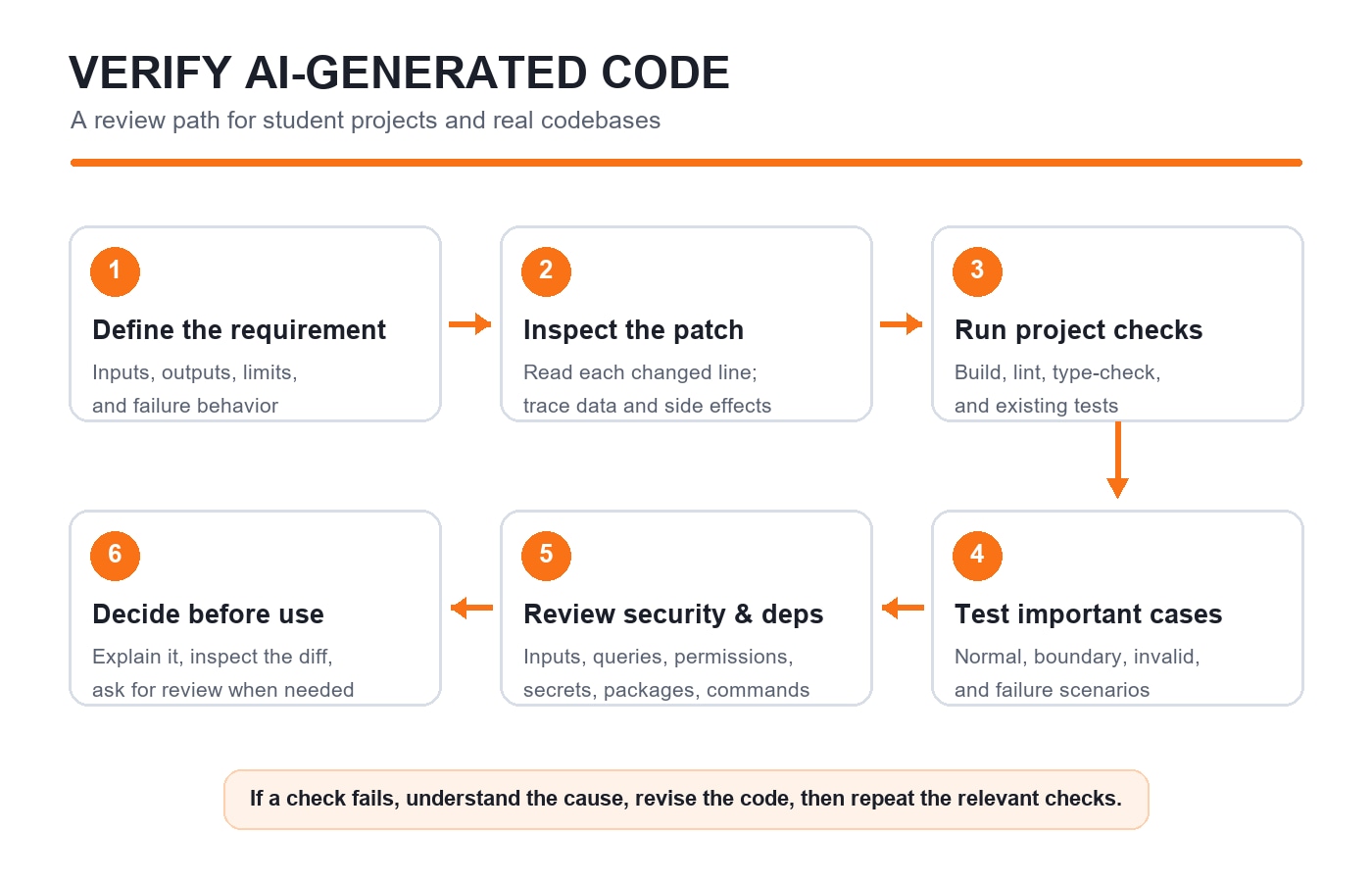
A quick review checklist
Before you keep or submit generated code, ask:
Can I explain what each important part does?
Does it meet the written requirement and fit the project’s conventions?
Have I checked normal, boundary, invalid, and failure cases?
Did the project’s relevant tests and checks pass?
Did I inspect every changed file, dependency, and command?
Could it expose data, grant excess access, or make an unsafe database or file operation?
Have I removed private information and avoided production credentials while testing?
Does my course, college, or employer allow this use of AI, and can I disclose it if required?
If you cannot answer one of these, pause and investigate before using the code. If the change touches security, payments, personal data, or production systems, ask an experienced reviewer to inspect it as well.
Make verification part of learning
AI-generated code is most useful when it helps you understand a solution, compare approaches, or find a starting point. Ask it to explain assumptions and suggest tests, then independently verify those details. The code you submit should still reflect your own understanding and follow the rules of your course or workplace.
For more programming practice, try Python output-based questions. For another student-focused view of using AI thoughtfully in a career context, read AI Is Changing Campus Hiring: How Students Can Show Their Skills.
The final test is simple: do not use code just because an AI produced it or a tool passed it. Use it only after you can explain it, test it against the requirement, and accept responsibility for what it does.
Keep learning
Useful AI Prompts for Students
Try practical AI prompts for understanding difficult topics, self-testing, planning study time, improving drafts, and debugging code while keeping your learning in your hands.
5 Nov 20265 min readTech & Innovation

What the UPI Payments Debate Teaches Us About System Design and IT Tech Careers
18 Sep 20266 min readTech & Innovation