

Useful AI Prompts for Students
Try practical AI prompts for understanding difficult topics, self-testing, planning study time, improving drafts, and debugging code while keeping your learning in your hands.
KnowledgeGate Team
Exam prep & CS education
5 Nov 20265 min read
When you are stuck on a topic, facing a blank page, or unsure what to revise next, an AI tool can help you get started. The useful prompt is not necessarily long; it gives the tool enough context to support your thinking while leaving the learning and final decisions with you.
Use these prompts as templates. Replace the bracketed details with your own subject, notes, question, and available time. Then check the answer against your textbook, class material, teacher’s instructions, or an official source.
A simple structure for better prompts
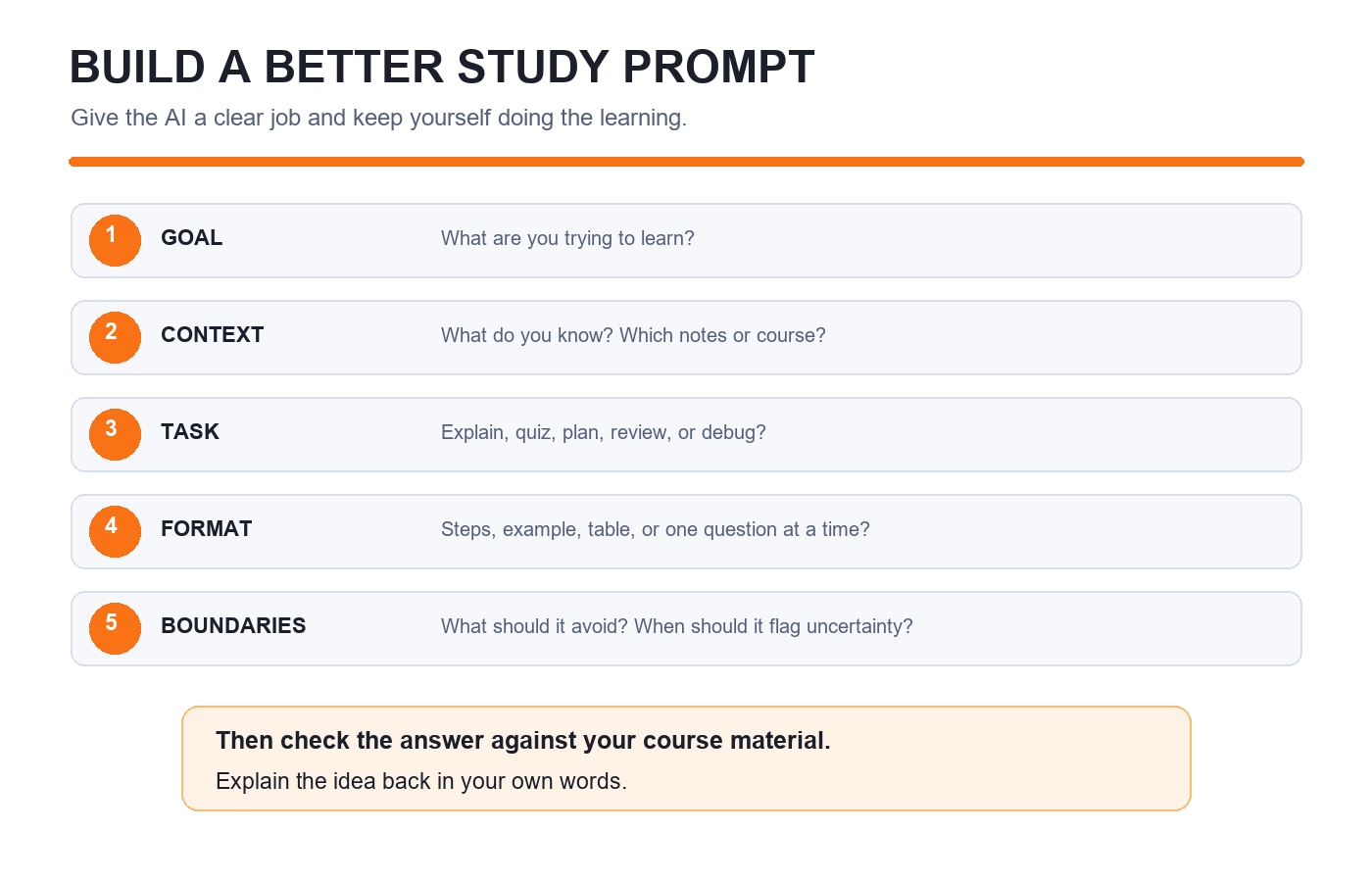
A focused prompt usually includes five things:
Goal: What are you trying to learn or complete?
Context: What do you already know, and what material should the tool use?
Task: What specific help do you want?
Format: Should it answer in steps, a table, examples, or one question at a time?
Boundaries: What should it avoid, and how should you check the result?
For example, instead of writing “Explain operating systems,” try:
I’m revising deadlocks for a computer science exam. I understand processes and resource allocation, but I’m confused about the four necessary conditions. Explain each condition using one small example. Then ask me three questions one at a time, and wait for my answer before giving feedback. If you are unsure about a claim, say so.
You can reuse the same structure for science, humanities, languages, or professional courses by changing the subject and task.
Prompts that help you understand a difficult idea
Ask for a second explanation. Use this when a lecture or textbook explanation is not clicking:
Explain [concept] in plain language for a student who knows [related idea]. Use one small example, then show how the example connects to the formal definition. Finish by naming one common misconception. Don’t skip the conditions or exceptions.
Ask for a Socratic tutor. Use this when you want to work through a problem yourself:
Help me solve this [problem]. Do not give the final answer yet. Ask one guiding question at a time. If I get stuck, give a small hint before showing a full step. After I solve it, check my reasoning and point out any gap.
This keeps you active in the problem instead of turning the AI response into a solution to copy.
Prompts for revision and self-testing
Turn your notes into a recall quiz:
Use only the notes below to make six short questions about [topic]. Ask one question at a time and wait for my response. After each answer, tell me what I got right, what I missed, and where the notes support the correction. Do not introduce facts that are not in the notes.
Make flashcards that test understanding:
Create eight flashcards from this chapter outline. Each card should test one important idea, compare two concepts, or ask when a rule applies. Keep answers short. Flag any card that needs information not included in my outline so I can verify it in the textbook.
Build a realistic study plan:
I have [number] days and [minutes] per day to revise [topics]. I find [topic] hardest and have already studied [topics]. Make a plan with short study blocks, question practice, and review sessions. Keep one flexible block for unfinished work. Do not assume I can study longer than the time I gave you.
Treat the plan as a starting point. Adjust it when your actual workload or understanding changes.
Prompts for writing and assignments
AI can help you improve your own draft without taking over the work:
Read my draft and the assignment instructions below. Do not rewrite it. Identify the three places where my reasoning is least clear, ask questions that would help me strengthen those parts, and flag statements that need evidence. Keep my wording intact.
You can also ask for feedback on structure:
Here is my outline and the assignment rubric. Check whether each rubric requirement has a place in the outline. Point out missing sections or repeated ideas, but do not write paragraphs for me. If a requirement is unclear, quote it and ask me what my instructor meant.
Follow your school’s rules for AI use, acknowledgement, and original work. Do not submit generated text as your own, and avoid sharing private information or unpublished work when you do not have permission to do so.
Prompts for coding practice
If you are learning to code, ask for hints that help you diagnose the issue:
I’m learning [language]. This code should [intended behaviour], but it currently [actual behaviour]. Explain the error message in beginner-friendly terms. Give me one debugging step at a time; don’t rewrite the whole program. After I try a fix, explain why it works or what to inspect next.
Before trusting a code suggestion, run it in a safe environment, test normal and edge cases, and make sure you understand every line. Do not paste passwords, API keys, personal records, or confidential code into an AI tool.
Prompts for checking your understanding
Ask the AI to challenge your explanation rather than simply praising it:
I will explain [concept] in my own words. Check whether the explanation is accurate and complete. Separate factual errors from missing detail, and ask me one follow-up question that tests whether I understand when the concept applies.
For exam practice, you can ask it to help analyse questions you provide:
I’m sharing [question or past-paper question] and my attempted solution. Identify the concept being tested, show where my reasoning first goes wrong, and give a hint for the next step. Don’t assume the question text is complete; tell me if any detail is missing.
Use official papers and your course materials to confirm the question and answer. A generated explanation can sound confident and still be wrong. UC Berkeley’s teaching guidance on examining GenAI output recommends activities that help learners verify sources and information. UNESCO’s AI competency framework for students also emphasizes critical judgement and responsible use.
Make each prompt specific, then review the result
If an answer is too broad, refine the request instead of accepting it as final. You might say, “Use the example from my notes,” “Explain the step where the sign changes,” or “Separate what is stated in my source from what you inferred.” Keep the source material nearby and verify dates, definitions, formulas, citations, and code with a trusted reference.
Avoid prompts that ask AI to “do my assignment,” invent sources, or produce a polished answer you cannot explain. Use it to generate questions, offer alternative explanations, give feedback, or help you find the next step. If your teacher or institution limits AI use for a task, follow those instructions.
KnowledgeGate’s Artificial Intelligence & Machine Learning course can help you learn the concepts behind AI tools. If you are using prompts to support exam preparation, explore GATE Guidance by Sanchit Sir. You can also read How to Use AI in Your Job Search Without Losing Your Own Voice for another example of using AI while keeping your own judgement central.
Start with one topic you are studying today. Give the tool a clear goal, useful context, and a boundary that keeps you doing the thinking. Then check the answer and explain the idea back in your own words.
Keep learning
★ Featured

How to Verify AI-Generated Code Before You Use It
Learn a practical checklist for reviewing AI-generated code, testing edge cases, checking dependencies, and spotting security risks before you use it.
30 Oct 20266 min read75 viewsTech & Innovation

What the UPI Payments Debate Teaches Us About System Design and IT Tech Careers
18 Sep 20266 min readTech & Innovation