

JDBC in Java Tutorial: Connections, Queries and Transactions with Examples
Build and run one Java 17 program that creates an H2 table, inserts three products, filters them safely, then rolls back and commits two stock updates.
KnowledgeGate Team
Exam prep & CS education
Updated 1 Nov 20266 min read
A JDBC program can connect yet leak resources, concatenate unsafe SQL or commit half a transaction. This runnable H2 example creates a products table, seeds Keyboard, Mouse and Webcam, runs a parameterised filter, rolls back a 7-unit order against stock 5, then commits 2 units and leaves stock 3. Its update counts make every state change checkable.
JDBC's job and the five objects in one database round trip
JDBC lets Java call a relational database through a driver. The driver translates java.sql calls, and the database executes SQL. JDBC is not an ORM.
DriverManager obtains a Connection. PreparedStatement binds values to fixed SQL, ResultSet exposes rows through a cursor, and SQLException reports failures.
Open, prepare, bind, execute, read, commit or roll back, then close with try-with-resources. H2 auto-registers from the runtime classpath.
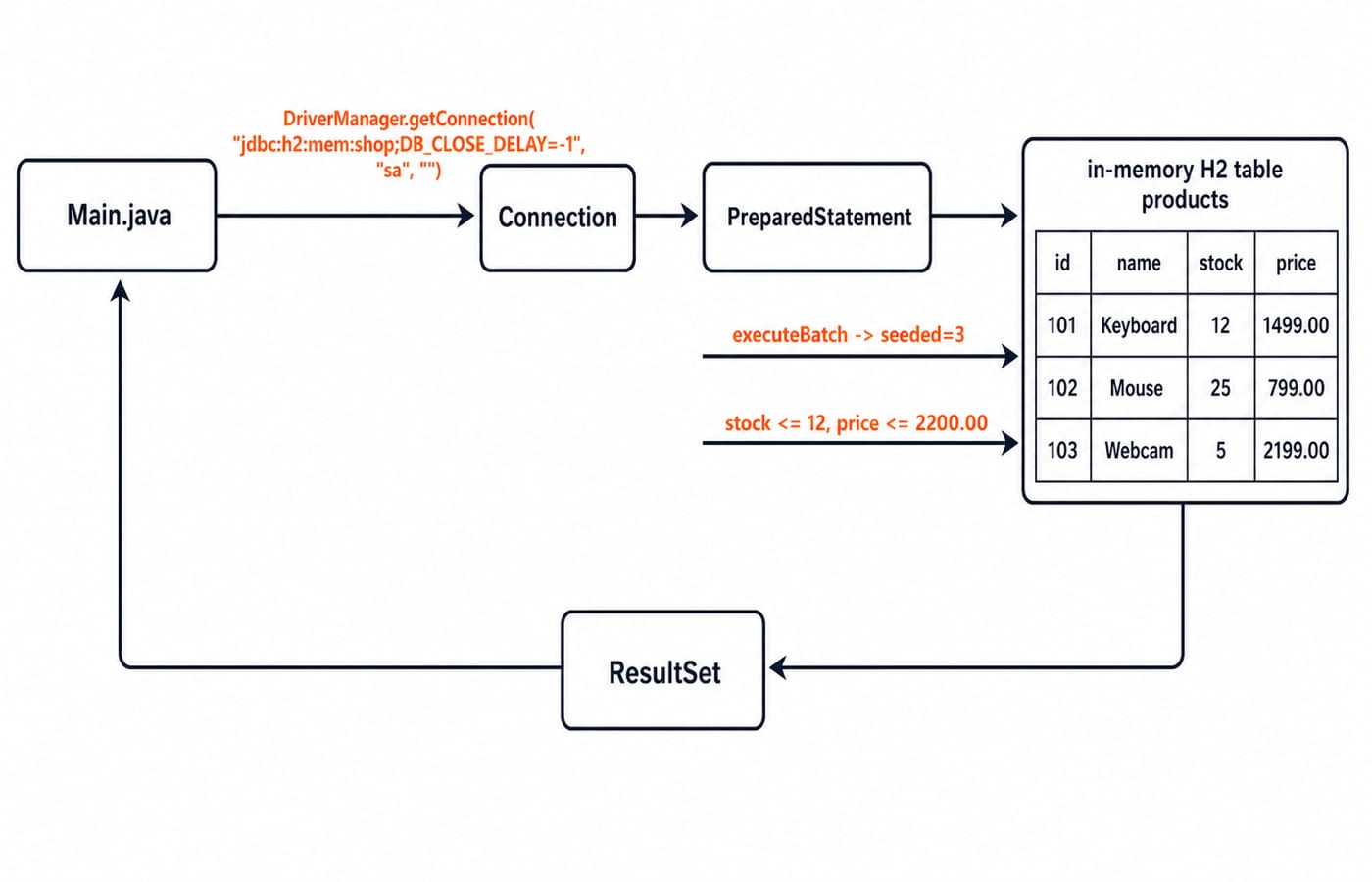
jdbc:h2:mem:shop;DB_CLOSE_DELAY=-1 selects H2, names the in-memory database shop, and keeps it alive after the first connection closes. Production code reads connection details from configuration and borrows pooled DataSource connections.
Build the runnable H2 project and seed three products
Use Java 17 and H2 2.3.232 in pom.xml:
<project xmlns="http://maven.apache.org/POM/4.0.0"
         xmlns:xsi="http://www.w3.org/2001/XMLSchema-instance"
         xsi:schemaLocation="http://maven.apache.org/POM/4.0.0 https://maven.apache.org/xsd/maven-4.0.0.xsd">
    <modelVersion>4.0.0</modelVersion>
    <groupId>example</groupId>
    <artifactId>jdbc-h2-demo</artifactId>
    <version>1.0-SNAPSHOT</version>

    <properties>
        <maven.compiler.release>17</maven.compiler.release>
        <project.build.sourceEncoding>UTF-8</project.build.sourceEncoding>
    </properties>

    <dependencies>
        <dependency>
            <groupId>com.h2database</groupId>
            <artifactId>h2</artifactId>
            <version>2.3.232</version>
        </dependency>
    </dependencies>

    <build>
        <plugins>
            <plugin>
                <groupId>org.codehaus.mojo</groupId>
                <artifactId>exec-maven-plugin</artifactId>
                <version>3.5.0</version>
                <configuration>
                    <mainClass>Main</mainClass>
                </configuration>
            </plugin>
        </plugins>
    </build>
</project>
Save the complete program as src/main/java/Main.java:
import java.math.BigDecimal;
import java.sql.Connection;
import java.sql.DriverManager;
import java.sql.PreparedStatement;
import java.sql.ResultSet;
import java.sql.SQLException;
import java.sql.Statement;
import java.util.Arrays;

public class Main {
    private static final String URL = "jdbc:h2:mem:shop;DB_CLOSE_DELAY=-1";
    private static final String USER = "sa";
    private static final String PASSWORD = "";

    public static void main(String[] args) throws SQLException {
        try (Connection con = DriverManager.getConnection(URL, USER, PASSWORD)) {
            createSchema(con);
            seedProducts(con);
            printLowStock(con, 12, new BigDecimal("2200.00"));

            placeOrder(con, 103, 7);
            System.out.printf("after failed order stock=%d%n", findStock(con, 103));

            placeOrder(con, 103, 2);
            System.out.printf("after successful order stock=%d%n", findStock(con, 103));
        }
    }

    private static void createSchema(Connection con) throws SQLException {
        String sql = "CREATE TABLE products (id INT PRIMARY KEY, "
                + "name VARCHAR(40) NOT NULL, stock INT NOT NULL, "
                + "price DECIMAL(10,2) NOT NULL)";
        try (Statement statement = con.createStatement()) {
            statement.executeUpdate(sql);
        }
    }

    private static void seedProducts(Connection con) throws SQLException {
        String sql = "INSERT INTO products (id, name, stock, price) VALUES (?, ?, ?, ?)";
        try (PreparedStatement ps = con.prepareStatement(sql)) {
            addProduct(ps, 101, "Keyboard", 12, new BigDecimal("1499.00"));
            addProduct(ps, 102, "Mouse", 25, new BigDecimal("799.00"));
            addProduct(ps, 103, "Webcam", 5, new BigDecimal("2199.00"));
            int seeded = Arrays.stream(ps.executeBatch()).sum();
            System.out.println("seeded=" + seeded);
        }
    }

    private static void addProduct(PreparedStatement ps, int id, String name,
                                   int stock, BigDecimal price) throws SQLException {
        ps.setInt(1, id);
        ps.setString(2, name);
        ps.setInt(3, stock);
        ps.setBigDecimal(4, price);
        ps.addBatch();
    }

    private static void printLowStock(Connection con, int maxStock,
                                      BigDecimal maxPrice) throws SQLException {
        String sql = "SELECT id, name, stock, price FROM products "
                + "WHERE stock <= ? AND price <= ? ORDER BY price ASC";
        try (PreparedStatement ps = con.prepareStatement(sql)) {
            ps.setInt(1, maxStock);
            ps.setBigDecimal(2, maxPrice);
            System.out.printf("query: stock<=%d and price<=%s%n",
                    maxStock, maxPrice.toPlainString());

            try (ResultSet rs = ps.executeQuery()) {
                while (rs.next()) {
                    System.out.printf("%d | %s | stock=%d | price=%s%n",
                            rs.getInt("id"), rs.getString("name"),
                            rs.getInt("stock"),
                            rs.getBigDecimal("price").setScale(2).toPlainString());
                }
            }
        }
    }

    private static void placeOrder(Connection con, int productId,
                                   int requested) throws SQLException {
        String sql = "UPDATE products SET stock = stock - ? "
                + "WHERE id = ? AND stock >= ?";
        boolean originalAutoCommit = con.getAutoCommit();
        SQLException pending = null;
        boolean resolved = false;

        try {
            con.setAutoCommit(false);
            try (PreparedStatement ps = con.prepareStatement(sql)) {
                ps.setInt(1, requested);
                ps.setInt(2, productId);
                ps.setInt(3, requested);
                int affected = ps.executeUpdate();

                if (affected == 1) {
                    con.commit();
                    resolved = true;
                    System.out.printf("COMMIT product=%d requested=%d affected=%d%n",
                            productId, requested, affected);
                } else {
                    int available = findStock(con, productId);
                    con.rollback();
                    resolved = true;
                    System.out.printf(
                            "ROLLBACK product=%d requested=%d available=%d affected=%d%n",
                            productId, requested, available, affected);
                }
            }
        } catch (SQLException ex) {
            pending = ex;
            try {
                con.rollback();
                resolved = true;
            } catch (SQLException rollbackEx) {
                ex.addSuppressed(rollbackEx);
            }
            throw ex;
        } finally {
            if (resolved) {
                try {
                    con.setAutoCommit(originalAutoCommit);
                } catch (SQLException restoreEx) {
                    if (pending != null) {
                        pending.addSuppressed(restoreEx);
                    } else {
                        throw restoreEx;
                    }
                }
            }
        }
    }

    private static int findStock(Connection con, int productId) throws SQLException {
        String sql = "SELECT stock FROM products WHERE id = ?";
        try (PreparedStatement ps = con.prepareStatement(sql)) {
            ps.setInt(1, productId);
            try (ResultSet rs = ps.executeQuery()) {
                if (!rs.next()) {
                    throw new SQLException("Unknown product: " + productId);
                }
                return rs.getInt("stock");
            }
        }
    }
}
From the project root, mvn -q compile exec:java compiles the class and runs it in one step. The full run prints eight lines:
seeded=3
query: stock<=12 and price<=2200.00
101 | Keyboard | stock=12 | price=1499.00
103 | Webcam | stock=5 | price=2199.00
ROLLBACK product=103 requested=7 available=5 affected=0
after failed order stock=5
COMMIT product=103 requested=2 affected=1
after successful order stock=3
The primary key makes each ID unique, NOT NULL rejects missing values, and DECIMAL(10,2) stores prices exactly where a double would drift. A real catalogue would push supplier and category names out into tables of their own rather than repeating them on every product row; DBMS Normalization Explained Simply for GATE covers that split.
PreparedStatement and ResultSet: run one exact filtered query
printLowStock prepares a SELECT with stock and price placeholders, binding 12 at position 1 and 2200.00 at position 2. Positions start at 1; placeholders replace values, not identifiers or keywords.
The cursor starts before the first row. Each rs.next() moves to a row; labelled getters read its columns. Try-with-resources closes the result before its statement.
Mouse qualifies on price at 799.00, but its stock of 25 breaks the stock <= 12 bound; Keyboard and Webcam meet both predicates. Practise with SQL Queries for Placement Interviews, Step by Step.
Transactions: roll back 7 webcams, then commit 2
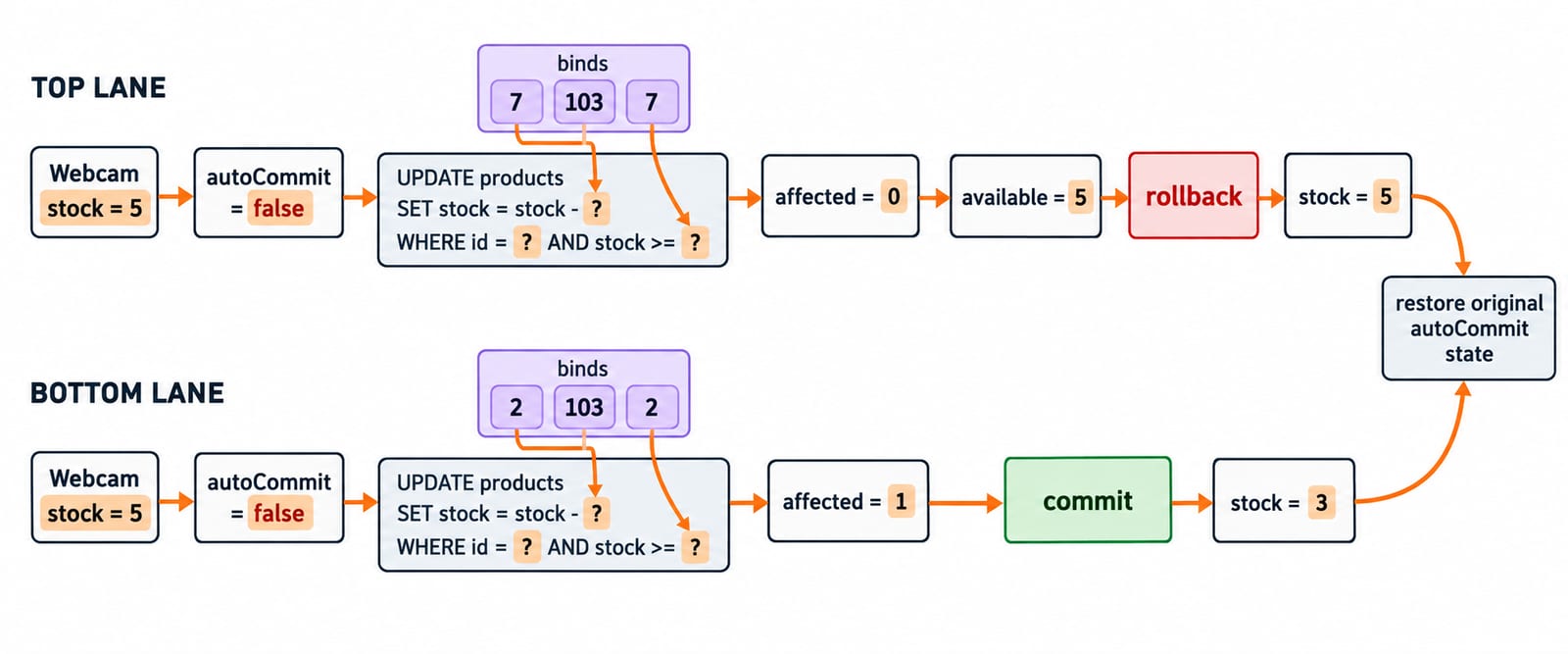
placeOrder saves and disables auto-commit, then runs UPDATE products SET stock = stock - ? WHERE id = ? AND stock >= ?. This guarded update avoids a separate read-then-write decision.
The first call binds (7, 103, 7). Stock 5 fails the guard, so executeUpdate() returns 0; rollback leaves 5. The second binds (2, 103, 2), changes one row, commits, and leaves 3. SQLException triggers rollback, preserves a rollback failure as suppressed, and rethrows the original exception. Auto-commit is restored only after commit or rollback succeeds.
Read JDBC results correctly: methods, types and ownership
executeQuery() hands back a ResultSet holding two rows here. Summed batch counts give 3; executeUpdate() gives 0 for rejection and 1 for commit. Reserve execute() for unknown result kinds.
Use getInt for id and stock, getString for name, and getBigDecimal for price. Nullable primitive getters need wasNull() or an object getter; these columns are NOT NULL.
Close results before statements and statements before connections. Nested try-with-resources performs this reverse-order cleanup.
Common JDBC errors: cause, consequence and replacement
"... WHERE name = '" + name + "'" mixes data with syntax, risking broken queries or injection. Keep SQL fixed and bind values.
setInt(0, 12)fails because the first placeholder is1. Bind it assetInt(1, 12).Reading before
rs.next()is invalid cursor access. Move first.doublecreates representation surprises for money. UseBigDecimalandDECIMAL.Missing
WHEREcan change every row. Constrain the update and inspect its count.Catching
SQLExceptionwithout rollback leaves work unfinished. Roll back and preserve the cause.Unclosed resources exhaust connections. Use try-with-resources and a configured
DataSourceor pool.
How assessments and interviews test JDBC reasoning
Tests ask you to order JDBC objects, choose PreparedStatement over Statement, predict a result loop, or select commit versus rollback from an update count. Interviews add two questions: what placeholders cannot represent, and why the stock guard belongs inside UPDATE instead of a separate SELECT.
Before ordering, set maximum stock to 4 and predict no rows. Set it to 25 with the same price cap and predict 102, 101, 103, ordered by prices 799.00, 1499.00, 2199.00. Run both cases.
JDBC in Java: the short version and next step
Obtain a connection.
Prepare fixed SQL.
Bind values starting at index
1.Move a result cursor with
next().Inspect every update count.
Make commit, rollback, and cleanup explicit.
Run the project, change product 103's request from 7 to 5, and predict committed stock 0 followed by a rollback on the 2-unit order that comes next. Continue with Java Course - Concepts, MCQs & Coding Questions, try Complete Java Course, or compare options under Coding & DSA Courses.
Keep learning
TreeMap and SortedMap in Java: Ordering, Range Views and Worked Examples
Learn how Java's TreeMap orders keys, answers floor and ceiling queries, exposes live range views, and handles comparator collisions through worked examples.
Updated 9 Nov 20266 min readJava
HashSet and TreeSet in Java: Runnable Examples and Key Differences
Learn how Java sets handle duplicates, ordering, navigation and custom objects through deterministic examples you can run and modify.
Updated 8 Nov 20265 min readJava
Java Garbage Collection Tutorial: Reachability, Leaks and Runnable Examples
Trace three connected objects, find exactly when each becomes eligible for collection, and repair a cache that keeps byte arrays reachable.
Updated 7 Nov 20266 min readJava
Java Memory Model Tutorial: Happens-Before, volatile and Safe Publication
Learn the Java Memory Model through exact start/join, volatile, synchronized, final-field and AtomicInteger examples, with clear happens-before guarantees.
Updated 6 Nov 20266 min readJava