

Directory Structure in Operating Systems: Paths, Links and a Worked Example
Build a clean mental model of directories, resolve absolute and relative paths step by step, and see what hard links, symbolic links and unlink operations really change.
KnowledgeGate Team
Exam prep & CS education
Updated 10 Nov 20266 min read

Many learners can draw a folder tree but still mix up a pathname with the file itself. Under time pressure, that confusion causes wrong lookup counts around .., and it makes the result of deleting a hard link seem mysterious. Names, routes and file-system objects are distinct. For the complete name-to-block lifecycle, including system calls, allocation, protection and crash consistency, use File Management in Operating Systems: Allocation, Directories and Worked Examples. Path-resolution problems instead demand component-by-component traces plus separate rules for hard links, symbolic links and unlinking.
What a directory stores, and what it does not store
A directory organises names and lets the OS locate file-system objects. In a common inode-based design, an entry maps a name such as notes.txt to an object identifier such as inode 55. It does not contain the file's data blocks.
Keep four layers separate. File content is the stored data. Metadata describes an object, including its type, size, ownership and block locations in a design. A directory entry connects a name to an object identifier. A pathname is a route through directory entries, not the object's identity.
The root directory starts the hierarchy. A directory's parent contains it, while a child entry is a name inside it. The current working directory starts relative paths. An absolute path starts at root, as in /home/anita/notes.txt. A relative path starts at the current working directory, so ../notes.txt from /home/anita/lab reaches the same location. Browse CS Fundamentals for Exams & Placements for the subject.
How pathname resolution works component by component
Path resolution proceeds from left to right. An absolute path begins at root; a relative path begins at the current working directory. At each step, the current object must be a directory, and the next component name must map to another object.
In the simplified model, . refers to the current directory and .. refers to its parent. They are still path components. Do not skip .. because it moves upward.
For all counts below, one named component means one logical directory-entry lookup, including ... We assume no cache. This is not a disk-I/O count: caches and file-system implementation details can change the number of physical reads.
Try a quick check. The current directory is /home/anita/lab, and the relative path is ../notes.txt. Its components are .. and notes.txt. The first reaches /home/anita; the second finds notes.txt. Therefore, the path takes two logical name lookups and reaches /home/anita/notes.txt, provided entries exist.
Worked example: paths, links and unlinking
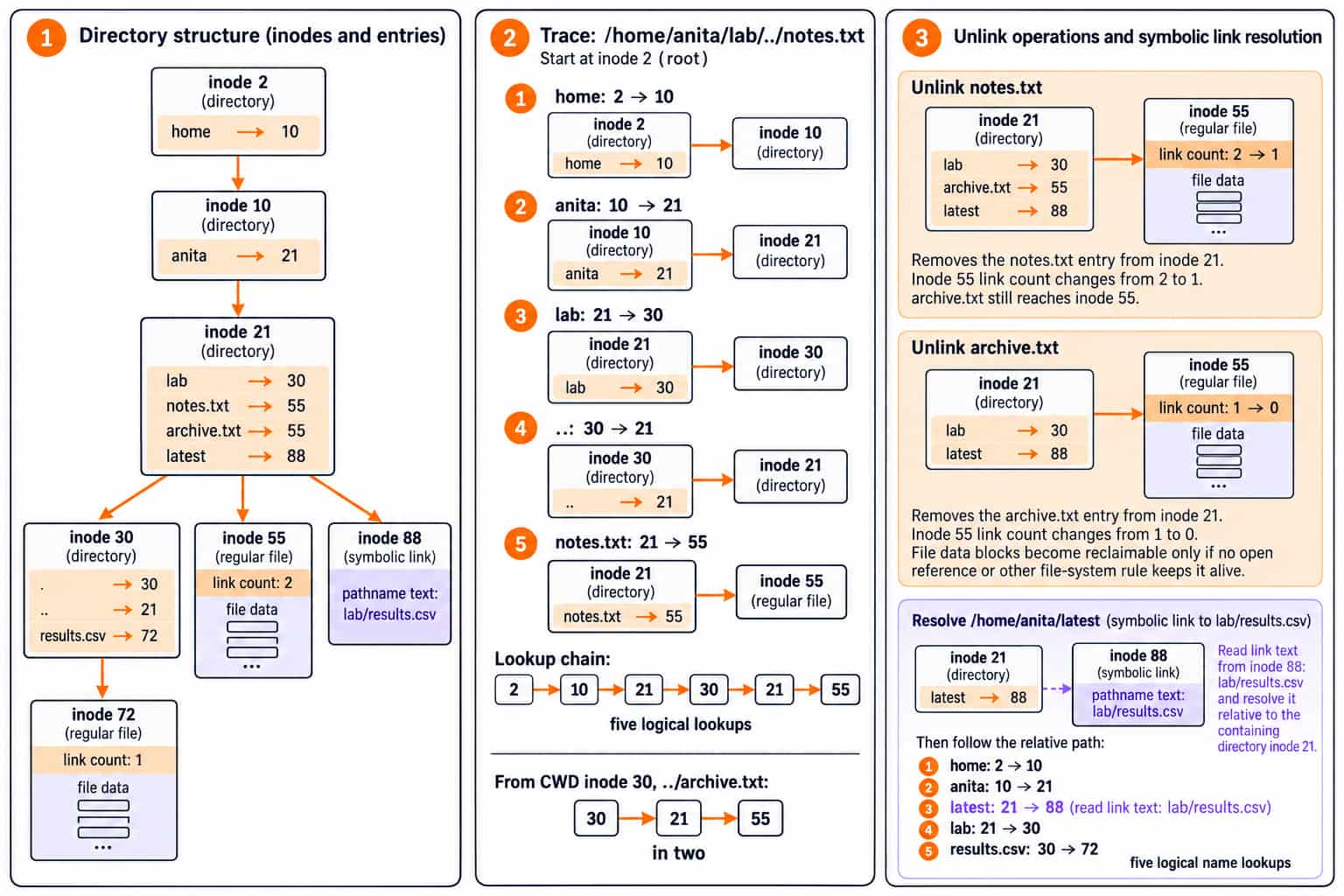
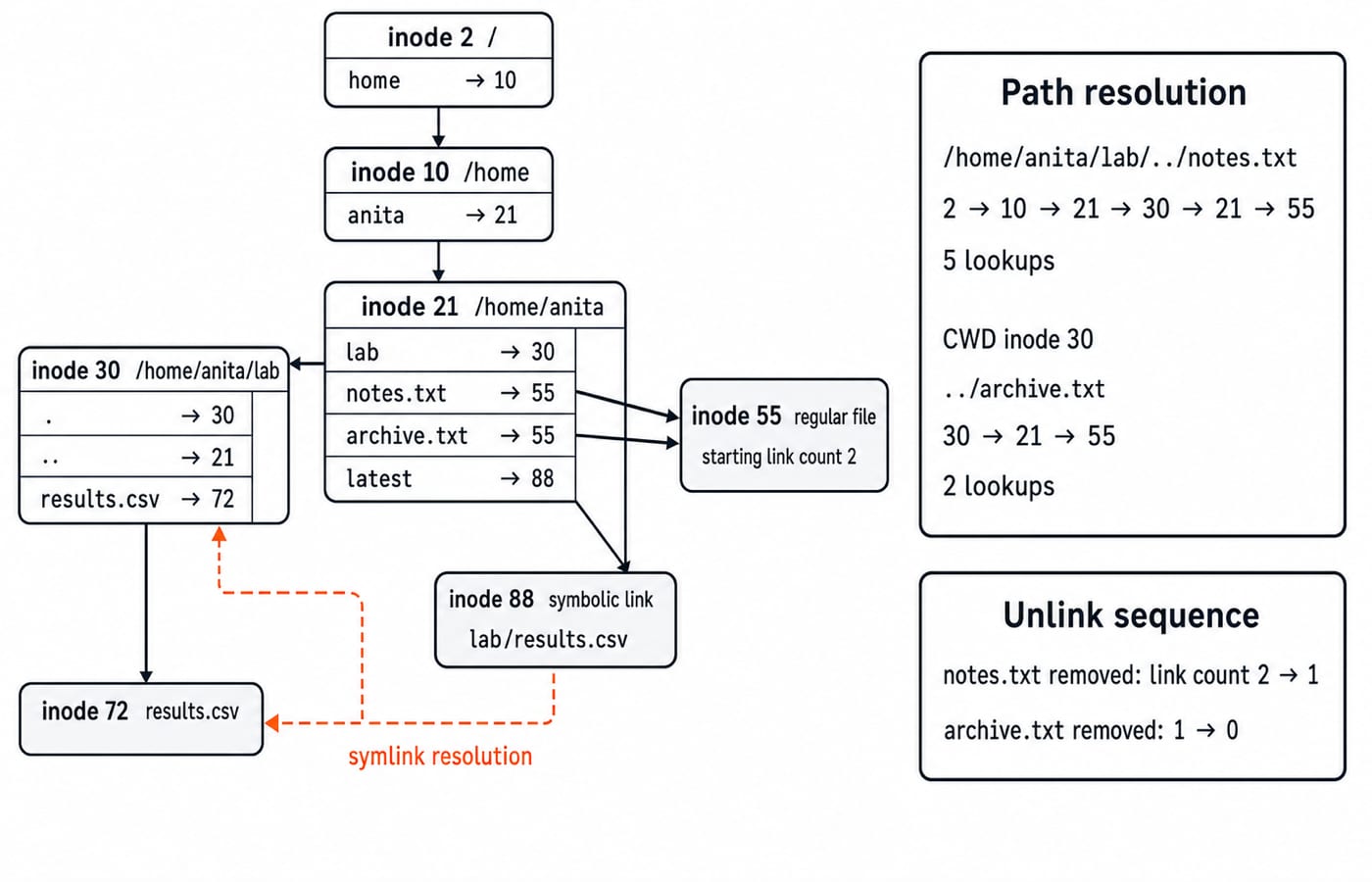
Inode 2 is /, with home -> 10. Inode 10 is /home, with anita -> 21. Inode 21 is /home/anita, with lab -> 30, notes.txt -> 55, archive.txt -> 55 and latest -> 88. Inode 30 is /home/anita/lab, with . -> 30, .. -> 21 and results.csv -> 72. Inode 55 is a regular file reached by both hard-link names, starting count 2. Inode 88 stores the relative symbolic-link text lab/results.csv.
Resolve /home/anita/lab/../notes.txt from inode 2:
home:2 -> 10anita:10 -> 21lab:21 -> 30..:30 -> 21notes.txt:21 -> 55
The chain is 2 -> 10 -> 21 -> 30 -> 21 -> 55, with five logical lookups. From CWD inode 30, ../archive.txt follows 30 -> 21 -> 55 in two, also reaching inode 55.
Unlink notes.txt. Its entry disappears from inode 21 and inode 55's link count changes from 2 to 1, but /home/anita/archive.txt still reaches the file. Unlink archive.txt and the count changes from 1 to 0. Its blocks become reclaimable only if no open reference or other file-system rule keeps it alive.
For /home/anita/latest, look up home, anita and latest. Resolve its lab/results.csv text from the containing directory, inode 21. Lookups for lab and results.csv reach inode 72 after five logical name lookups. A symbolic link stores pathname text; a hard-link entry points to inode 55.
Single-level, two-level, tree and graph structures
Structure | Allowed organisation | Main benefit | Main limitation |
|---|---|---|---|
Single-level | All names together | Simple | Name collisions |
Two-level | Separate user directories | Reuses names | Awkward sharing |
Tree | Arbitrary hierarchy | Unique absolute entry paths | No cross-branch sharing |
Acyclic graph | Sharing without cycles | Avoids copies | Harder traversal and deletion |
General graph | Sharing with cycles | Flexible links | Cycle-safe traversal and reclamation |
Anita and Bala each need report.txt. Single-level cannot keep both names. Two-level directories can store /anita/report.txt and /bala/report.txt. If both point to inode 90, the namespace is graph-shaped, not a strict tree.
notes.txt and archive.txt likewise make this an acyclic graph at the file-entry level because both reach inode 55. Directory hard-link restrictions are implementation policy. The published File systems and disk scheduling in OS: allocation, directories and seek time owns allocation choices, free-space maps and disk-head ordering; component paths, relative symlinks and unlink effects require the directory-object trace used above.
Operations and traps that cause wrong answers
Directory operations include path traversal, entry creation, listing, renaming or moving, and unlinking. Within one file system, renaming commonly changes entries without copying data. Do not assume this across file systems.
Trap | Why it fails | Correct check |
|---|---|---|
Filename is identity | Names may share an inode | Track inode |
One hard-link deletion deletes data | Another name may remain | Update link count |
Symbolic link stores inode | It stores path text | Resolve from containing directory |
Skip | It is a component | Count it |
Tree equals acyclic graph | A graph permits sharing | Check shared targets |
Search equals listing | The actions differ | Separate traversal from listing |
On Unix-like systems, directory read permission allows listing names, execute permission allows traversal or search, and changing entries generally requires write plus execute permission on the parent directory. Platform-specific rules can add further checks.
20-second check: after removing notes.txt, inode 55 remains reachable through archive.txt. After removing both entries, its link count is 0.
How practice turns directory structure into solvable questions
KnowledgeGate has 30+ practice questions on directory structure. The five common forms are:
classify a structure from its sharing and cycle rules;
resolve an absolute or relative path;
count logical lookups under supplied assumptions;
update a hard-link count after unlink operations; or
distinguish hard and symbolic links after a rename or removal.
Do three mini checks. First, from inode 30, ../archive.txt takes two logical lookups and reaches inode 55. Second, after only notes.txt is unlinked, inode 55's link count is 1. Third, two directory entries reaching inode 55 mean the namespace is not a strict tree at the object level.
These are patterns in KnowledgeGate's practice questions, not an official exam blueprint. File Systems and I/O for GATE: Allocation, Inodes and Worked Examples uses hard-link counts as one layer beside file descriptors, inode addressing, allocation and service-time calculations. Directory questions instead require component-by-component resolution, the base directory of a relative symbolic link and the namespace shape created by shared targets.
The short version and the next step
Use this retrieval sequence:
Identify the starting directory.
Split the path into components.
Map each name to an object.
Separate a hard-link inode reference from symbolic-link path text.
Update link counts only when an entry is unlinked.
Redraw the inode diagram from memory, reproduce both lookup totals, and explain why inode 55 survives the first unlink. Choose Zero to Hero: Complete CS Course for a structured semester-oriented route through core computer science.
Go deeper with the full courseOperating System
Keep learning

Directory Structure MCQs: 12 Solved OS Questions with Explanations
Solve 12 directory structure questions covering file attributes, directory models, Unix commands, links, inode addressing and block bookkeeping. Each answer includes a direct explanation or complete calculation.
Updated 29 Oct 20268 min readOperating System MCQs

File Management in Operating Systems: Allocation, Directories and Worked Examples
Connect a filename to its inode, open-file state, and physical blocks. Then compare allocation methods and solve one complete block-allocation example.
Updated 3 Sep 20267 min readOperating Systems

Python os and pathlib Tutorial: Paths, Files and Directories
Build one small Python workspace from start to finish. Learn portable paths, file operations, directory walks, safe renames, environment variables and deliberate cleanup.
Updated 1 Nov 20265 min readPython

File systems and disk scheduling in OS: allocation, directories and seek time
A file system is the operating system's answer to a simple-sounding question: where on the disk does each file's data actually live, and how do we find it again quickly? Disk scheduling is the follow-up: when many read and write requests are queued, in what order should the head service them so the disk arm travels least? The two meet in one place: how the file system scatters a file's blocks decides how far the arm travels to read them back. Both are steady exam scorers.
Updated 30 Oct 20265 min read114 viewsOperating Systems