Wrapper Classes and Autoboxing in Java: Worked Examples and Null Traps
Learn why Java wrapper classes exist, how boxing and unboxing work, and where nulls, reference identity, and overload selection create surprises.
KnowledgeGate Team
Exam prep & CS education
Updated 1 Oct 20265 min read
Java often lets int and Integer look interchangeable, until a collection rejects int, a comparison gives a surprising result, or a nullable wrapper fails at runtime. The confusion comes from treating a primitive value and an object reference as the same thing. Primitive values and wrapper references are distinct. Each primitive has a corresponding wrapper, and List<Integer> programs demonstrate boxing and unboxing.
Wrapper classes in Java: the primitive-to-object map
A primitive stores a value directly. Its wrapper is an immutable object that represents a value of the corresponding primitive type.
Primitive | Wrapper class |
|---|---|
|
|
|
|
|
|
|
|
|
|
|
|
|
|
|
|
The object form exists because generic APIs such as List<Integer> require reference types, wrappers can represent null, and wrapper classes provide useful parsing, comparison, and conversion methods. The six numeric wrappers extend Number; Character and Boolean do not.
Before considering automatic conversion, see the explicit operations:
int raw = 42;
Integer boxed = Integer.valueOf(raw);
int again = boxed.intValue();
Both raw and again contain 42. The Coding & Skills category is a broader route through Java and other programming foundations.
Autoboxing and unboxing in Java: what the compiler inserts
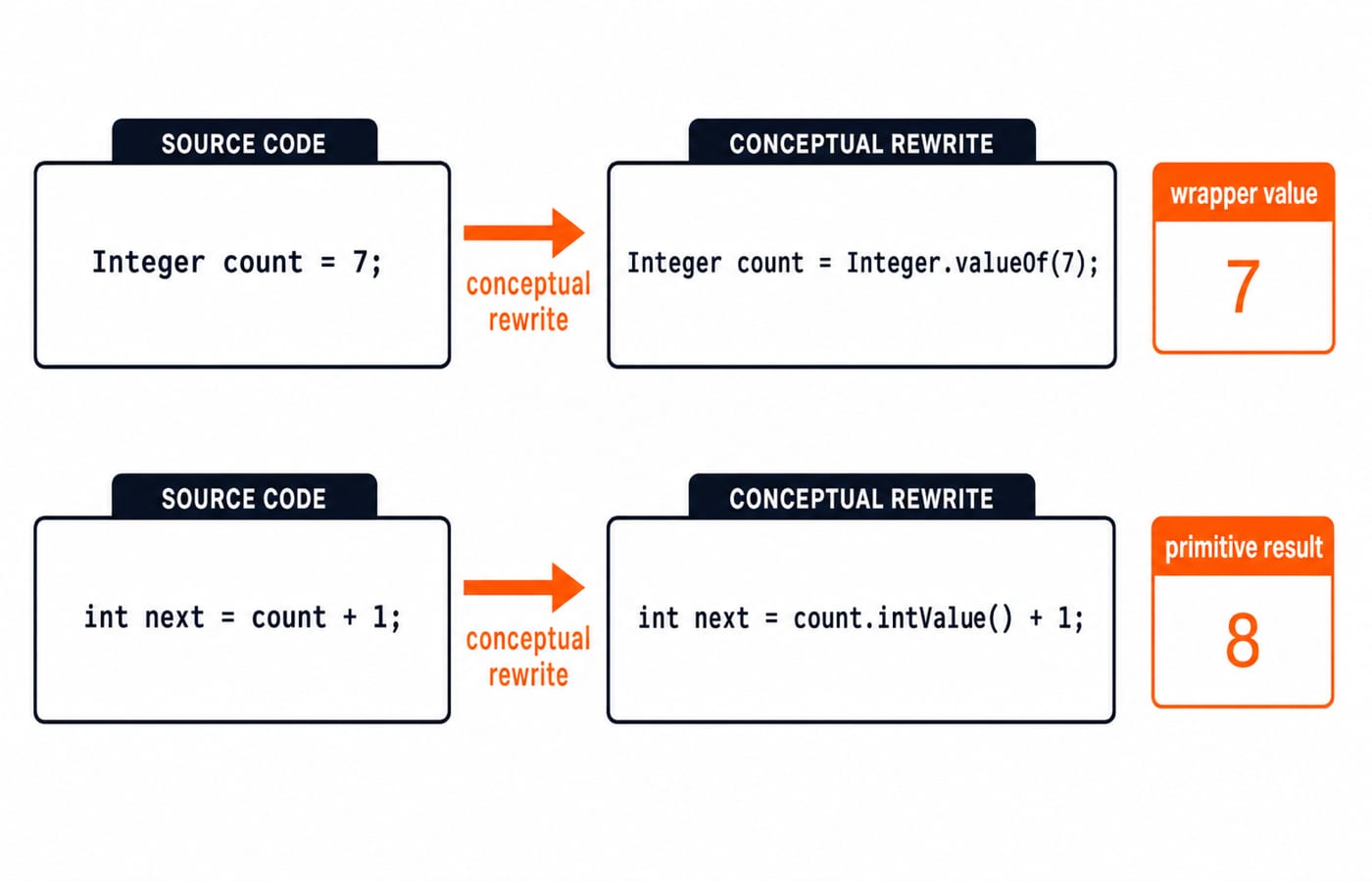
Autoboxing converts a primitive to its wrapper. Unboxing converts a wrapper reference to its primitive value. Conceptually, the compiler rewrites:
Integer count = 7;as Integer count = Integer.valueOf(7);, and it treats:
int next = count + 1;as int next = count.intValue() + 1;. Therefore:
System.out.println(count);
System.out.println(next);
prints 7 and then 8.
For count++, Java reads wrapped value 7, unboxes it, adds primitive 1 to obtain 8, boxes 8, and assigns the new reference to count. The original Integer object is not mutated because wrapper objects are immutable.
Autoboxing worked example: trace a List<Integer> score total
Here is one complete runnable example:
import java.util.ArrayList;
import java.util.List;

public class ScoreTotal {
    public static void main(String[] args) {
        List<Integer> scores = new ArrayList<>();
        scores.add(12);
        scores.add(15);
        scores.add(18);

        int total = 0;
        for (Integer score : scores) {
            total += score;
        }

        double average = (double) total / scores.size();
        System.out.println("Total = " + total);
        System.out.println("Average = " + average);
    }
}
Each add call boxes its primitive argument through Integer.valueOf, so the list holds wrappers representing 12, 15, and 18. Each loop iteration unboxes score before addition. The primitive total changes as follows: 0 + 12 = 12, 12 + 15 = 27, and 27 + 18 = 45.
The list size is 3. The cast makes the division floating-point, so (double) 45 / 3 produces 15.0. The exact output is:
Total = 45
Average = 15.0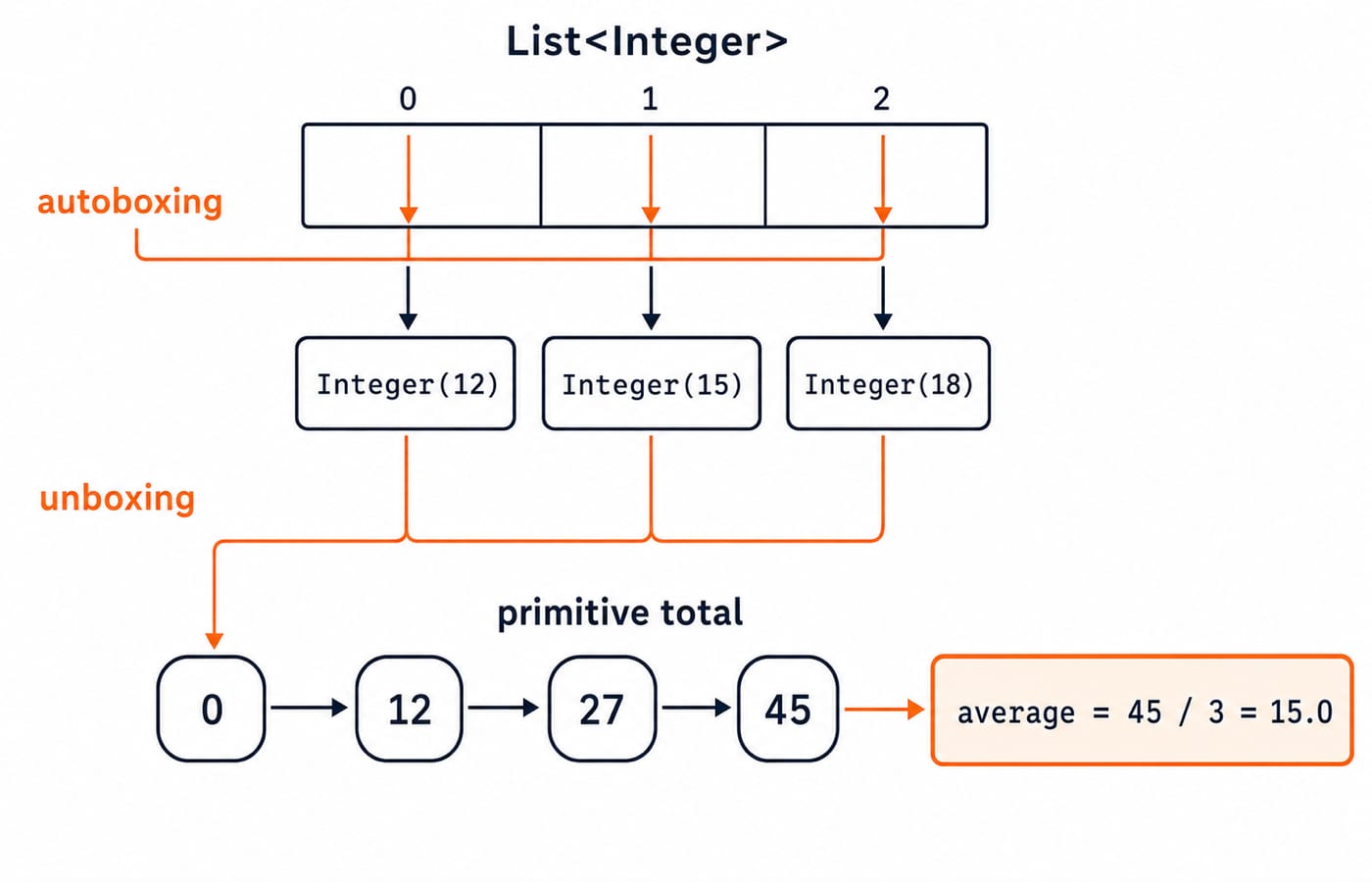
Java wrapper methods: parsing, conversion, and value comparison
Wrapper methods make boundaries between text, primitives, and objects explicit:
Expression | Return type | Result |
|---|---|---|
|
|
|
|
| wrapper value |
|
|
|
|
|
|
Parsing "42kg" throws NumberFormatException, so validate or handle input where the string enters your program.
For wrapper values, use equals. With Integer first = Integer.valueOf(128); and Integer second = Integer.valueOf(128);, first.equals(second) is true. The == operator asks whether the references identify the same object, not whether the represented numbers are equal. The Java Course: Concepts, MCQs & Coding Questions places these utilities inside a structured Java sequence with practice.
Autoboxing traps in Java: null, caching, and overload resolution
The most serious trap is unboxing null:
Integer attempts = null;
if (attempts > 0) {
    System.out.println(attempts);
}
Evaluating the condition first requires attempts.intValue(), which throws NullPointerException; the body prints nothing. Use if (attempts != null && attempts > 0). Objects.requireNonNullElse(attempts, 0) is another option only when the domain genuinely defines missing as zero.
Caching creates an identity trap. Integer a = 127; Integer b = 127; System.out.println(a == b); prints true because boxing constant 127 uses Java's required small-value identity range. For a value such as 128, an implementation may cache more values, so identity is never a sound value test. Use equals.
Overload selection has its own rule:
static void pick(long value) { System.out.println("long"); }
static void pick(Integer value) { System.out.println("Integer"); }

pick(7);
This prints long. Widening primitive int to long is considered before boxing to Integer. Generics still require reference types, so List<int> is a compile-time error while List<Integer> is valid.
Boxing at collection and API boundaries: choose deliberately
Choice | What it stores | Best fit |
|---|---|---|
| Primitive values, sum | Local numeric work without nulls |
| References to wrappers, possibly | Generic collection APIs and meaningful absence |
Wrapper collections add object and reference handling, and a null element can fail during unboxing. Primitive arrays fit when you do not need nullability or generic collection behaviour. Prefer primitives for local arithmetic and counters; use wrappers when an API requires an object or absence has real meaning.
For example, Integer total = 0 in an arithmetic loop repeatedly unboxes and reboxes the running value. int total = 0 avoids that conversion cycle. The Stacks and Queues guide is a useful follow-on for tracing operations and choosing element types. For a placement-focused route from Java mechanics into collections and problem solving, use DSA using Java: Placement Preparation Course.
Wrapper classes and autoboxing in exams and interviews
Test each result by naming the conversion involved:
List<int>does not compile. A generic type argument must be a reference type, so useList<Integer>.Integer n = null; int x = n + 1;throwsNullPointerExceptionbecause addition unboxesn.Given the earlier overloads,
pick(7)printslongbecause primitive widening is selected before boxing.Integer.valueOf(128).equals(Integer.valueOf(128))istruebecauseequalscompares represented values, not reference identity.
For a debugging exercise, repair Integer quantity = null; int billable = quantity;. Reject missing data with Objects.requireNonNull(quantity, "quantity"), or supply 0 only when the business rule defines missing as zero. That decision is more precise than a vague instruction to check for null.
Interviews may ask both whether such code is correct and what repeated conversions or collection operations imply. The Generics in Java guide uses type parameters, bounds and wildcards to explain what List<Integer> means; this example instead isolates the boxing and unboxing steps inside add calls and loop additions.
Wrapper classes and autoboxing: the short version and next step
Wrappers are object forms of primitive values.
Boxing converts a primitive to a wrapper.
Unboxing
nullthrowsNullPointerException.equalscompares wrapper values, while==compares references.Prefer primitives for arithmetic and wrappers at object-required or genuinely nullable boundaries.
Use the Java Course for the full language sequence. Choose DSA using Java when you are moving from syntax into placement-focused data structures and algorithms. As a practical next step, run the score example, replace one score with null, observe where unboxing fails, and then implement an explicit missing-value rule.
Keep learning
Abstraction and Interfaces in Java: Abstract Classes, Contracts and Runnable Examples
Learn when Java needs an abstract class, when it needs an interface, and how both work together in one runnable charge-calculation program with exact outputs.
Updated 6 Oct 20266 min readJava

Synchronization in Java: Monitors, Race Conditions and Runnable Examples
Learn why Java threads lose updates, what each synchronized form locks, and how to build safe counters, inventory checks and condition-waiting code.
Updated 26 Sep 20266 min readJava

Java Streams API Tutorial: Filter, Map, Reduce and Collect with Runnable Examples
Learn Java streams from the source-to-terminal mental model, then trace operations, reductions and collectors through runnable examples and practice tasks.
Updated 24 Sep 20265 min readJava
Optional in Java: Null-Safe Patterns with Runnable Examples
Learn Java Optional from creation to stream pipelines through one user lookup. Trace present and empty paths, compare fallbacks, and repair common mistakes.
Updated 23 Sep 20265 min readJava